---
title: Comment trouver l’identifiant de votre logement sur Clévacances ?
description: Comment créer une propriété à partir de votre annonce Clévacances ? À quelle question votre article répond-il ?
---
[Passer au contenu](https://market.yaago.com/fr/yaago-stay/comment-créer-une-propriété-à-partir-de-votre-annonce-clévacances-à-quelle-question-votre-article-répond-il-0#main-content)
Français
Afficher le sous-menu pour les traductions
[Plus de support](https://market.yaago.com/fr/yaago-stay/kb-tickets/new?hsLang=fr) [Customer port](https://market.yaago.com/ticketsupport?hsLang=fr)
[](https://app.yaago.com)
- [Retour vers Yaago webapp 🖥️](https://www.yaago.com)
- Yaago Academy 👨🏫
Ouvrir la navigation principale
Fermer la navigation principale
- [Retour vers Yaago webapp 🖥️](https://www.yaago.com)
- Yaago Academy 👨🏫
- Français
Afficher le sous-menu pour les traductions
- [Plus de support](https://market.yaago.com/fr/yaago-stay/kb-tickets/new)
- [Customer port](https://market.yaago.com/ticketsupport)
Comment pouvons-nous vous aider ?
- Il n'y a aucune suggestion car le champ de recherche est vide.
1. [YAAGO STAY](https://market.yaago.com/fr/yaago-stay?hsLang=fr)
2. [📱Livret d'accueil](https://market.yaago.com/fr/yaago-stay/livret-daccueil?hsLang=fr)
# Comment trouver l’identifiant de votre logement sur Clévacances ?
L’identifiant de votre logement se trouve dans l’adresse de sa fiche, depuis votre espace propriétaire Clévacances.
**
1\. Accédez à votre logement**
Connectez-vous à votre **espace propriétaire Clévacances**, puis cliquez sur l’onglet **Mes biens**. Sélectionnez le logement concerné pour ouvrir sa fiche.
**2. Repérez l’identifiant dans l’adresse de la page**
Dans la barre d’adresse de votre navigateur, repérez le numéro situé après `/hotels/`.
Par exemple, pour l’adresse :
`https://www.clevacances.com/fr/account/hotels/41027`
👉 L’identifiant du logement est **41027**.
**3. Copiez l’identifiant**
Copiez uniquement le numéro, sans le reste de l’adresse, pour le renseigner dans Yaago.
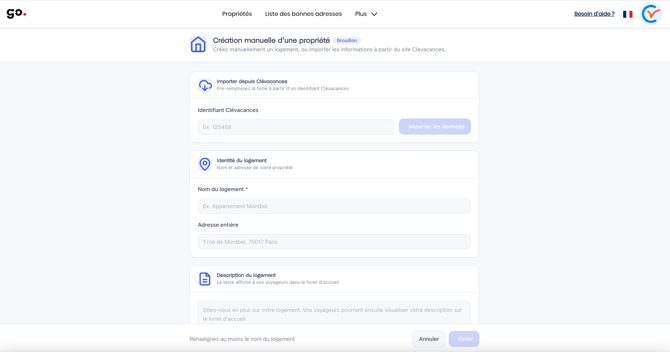
💡 **Vous avez plusieurs logements ?** Répétez ces étapes pour chaque bien, en vérifiant que la fiche ouverte correspond au logement que vous souhaitez associer.
- [📱Livret d'accueil](https://market.yaago.com/fr/yaago-stay/livret-daccueil?hsLang=fr)
- [📖 Guides](https://market.yaago.com/fr/yaago-stay/guides?hsLang=fr)
- [📍Bonnes adresses](https://market.yaago.com/fr/yaago-stay/bonnes-adresses?hsLang=fr)
- [📞 Numéros Utiles](https://market.yaago.com/fr/yaago-stay/num%C3%A9ros-utiles?hsLang=fr)
[](http://www.yaago.com)
Copyright © 2026, Yaago est éditée par INFINE FRANCE SAS