---
title: Comment créer mon premier guide?
description: Guides
---
[Passer au contenu](https://market.yaago.com/fr/yaago-stay/comment-créer-mon-premier-guide#main-content)
Français
Afficher le sous-menu pour les traductions
[Plus de support](https://market.yaago.com/fr/yaago-stay/kb-tickets/new?hsLang=fr) [Customer port](https://market.yaago.com/ticketsupport?hsLang=fr)
[](https://app.yaago.com)
- [Retour vers Yaago webapp 🖥️](https://www.yaago.com)
- Yaago Academy 👨🏫
Ouvrir la navigation principale
Fermer la navigation principale
- [Retour vers Yaago webapp 🖥️](https://www.yaago.com)
- Yaago Academy 👨🏫
- Français
Afficher le sous-menu pour les traductions
- [Plus de support](https://market.yaago.com/fr/yaago-stay/kb-tickets/new)
- [Customer port](https://market.yaago.com/ticketsupport)
Comment pouvons-nous vous aider ?
- Il n'y a aucune suggestion car le champ de recherche est vide.
1. [YAAGO STAY](https://market.yaago.com/fr/yaago-stay?hsLang=fr)
2. [Guides](https://market.yaago.com/fr/yaago-stay/guides?hsLang=fr)
# Comment créer mon premier guide?
💡Un guide est une information liée à une propriété. Il peut contenir du texte, des photos, des vidéos, des documents (PDF, notices d'utilisation, etc.) ou encore une géolocalisation. Chaque guide traite d'un sujet précis, comme la cafetière, le parking ou le Wi-Fi.
Pour créer un guide :
1. Cliquez sur le menu **“Propriétés”**
2. Cliquez sur le bouton **“Guide(s)”** de la propriété souhaitée
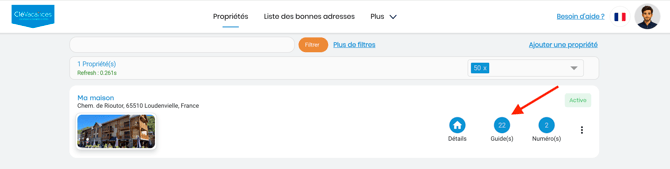
3. Consultez les catégories qui s'affichent à gauche (Direction, Arrivée, Parking, etc.)
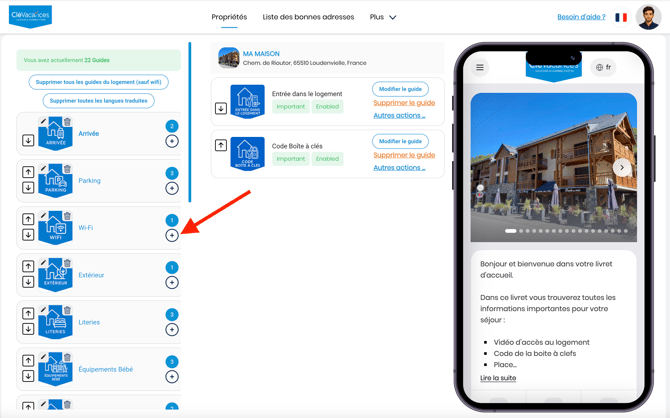
4. Cliquez sur le bouton ➕ de la catégorie de votre choix (Par exemple : Parking)
5. Complétez le formulaire avec les informations souhaitées
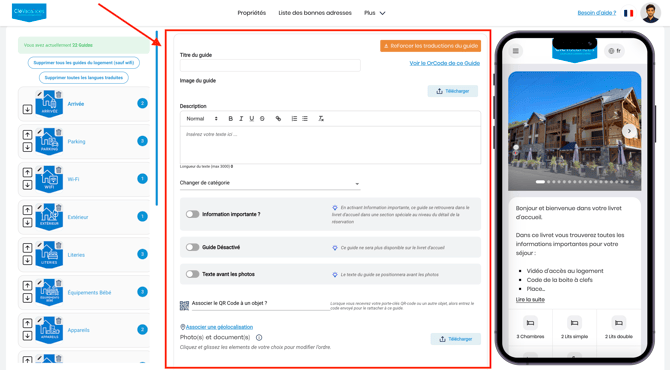
6. Cliquez sur le bouton **“Enregistrer”**
Merci d'avoir consulté notre Help Center. Nous espérons que vous avez trouvé les réponses à vos questions 😊
- [Bonnes adresses](https://market.yaago.com/fr/yaago-stay/bonnes-adresses?hsLang=fr)
- [Guides](https://market.yaago.com/fr/yaago-stay/guides?hsLang=fr)
- [Numéros Utiles](https://market.yaago.com/fr/yaago-stay/num%C3%A9ros-utiles?hsLang=fr)
- [Livret d'accueil](https://market.yaago.com/fr/yaago-stay/livret-daccueil?hsLang=fr)
[](http://www.yaago.com)
Copyright © 2026, Yaago est éditée par INFINE FRANCE SAS